Tutorial
| Membership |
By purchasing a Membership you will receive
$35,000,000 Game Cash and 50 Game Credits!!!
Members may accumulate up to 125 game credits daily and 2 extra credits per hour!!
Member accounts also receive the ability to have their properties grow past 100% based upon
the amount of networth you destroy on other player's properties. The growth is as follows:
- 1% Increase at $25 Million Destroyed
- 2% Increase at $75 Million Destroyed
- 3% Increase at $150 Million Destroyed
- 4% Increase at $300 Million Destroyed
- 5% Increase at $500 Million Destroyed
- 6% Increase at $750 Million Destroyed
- 7% Increase at $1 Billion Destroyed
- 8% Increase at $1.5 Billion Destroyed
- 9% Increase at $2 Billion Destroyed
- 10% Increase at $2.5 Billion Destroyed
- 11% Increase at $3 Billion Destroyed
- 12% Increase at $3.5 Billion Destroyed
- 13% Increase at $4 Billion Destroyed
- 14% Increase at $4.5 Billion Destroyed
- 15% Increase at $5 Billion Destroyed
- + 1% for every $1 Billion there after destroyed
This will help you rebuild if you are hitting and are being hit later in the round!!
|
| |
| Referrals |
Refer someone to the game and if they spend any money (membership/Game Cash purchase) you will
receive 15% of the purchase!!!
When the player signs up they must enter your PLAYER ID in the referral section for the
account to receive the bonus. We will not credit any accounts that are already created in the game that do not have a referral player associated. This must be
done at the account creation stage.
Check your Profile page for a referral link you can send to your friends or add to your web site!! |
| |
| Quick Starting Tips |
- Look at the Hostile Nations Property Chart to determine which building type will
make money by another building type.
- Place a few Housing and Food buildings next to your Power Station and Bank. This will help
them start making money in a shorter period of time.
- Build lower cost items at first. Do not buy the highest priced item you can afford until
all of your building types have hit 100% Capacity Level. As they do make money for you, slowly
sell off your lower cost items and replace them with higher cost items to gain greater returns.
- Do not go to war if you can not afford it!!
- Buildings may appreciate fully (if surrounded by enough building types to help them) after 8 Hours.
- If a building's expiration date is up, the building will then start to deteriorate to the point it loses money.
Once the building has expired, you will not receive any money selling it and can only Tear it Down. You may sell
a building before it expires and receive 3/4 the purchase value minus a $100,000 Tear Down cost.
|
| |
| How To Play |
| |
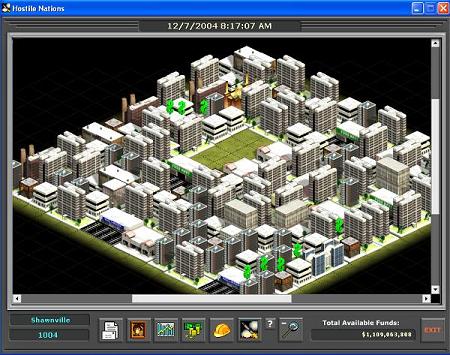
Screen Shot |
- Each player is given one PowerPlant, one Bank, and $30,000,000 Game Cash at the start of the game
- Increase your building's capacity levels by placing other building types next them
(Check the Hostile Nations Property Chart for compatible types)
- Game Interface
- The game interface consists of a 800x600 window which requires your screen resolution to be at least
800x600. The game is best viewed with 1024x768 or greater.
- The game requires a minumum Windows 2000, 1GHz Pentium III processor, 128 RAM, and 56K modem connection. Faster
machines will run the game smoothly!!!
- Macromedia Flash Player 9 or higher
- When you log into the game, the downloaded version will be checked with the current version available. If the
version you are running is outdated, a message will be displayed requiring you to download the latest version. You
must have the current version to access the game. It is free to download!!!
- The date listed at the top of the game window represents the last poll time. The game polls the database looking
for any losses/profits from buildings, new attacks, building selling/hazmat through detailed listing, new messages, etc.
There is aproximately 10-15 seconds between polls depending upon connection and speed of your computer
- In the middle of the game window is your map and/or conent information. Any information is loaded in this area
when selecting the toolbar buttons at the bottom of the screen.
- Your username and Player ID are listed on the bottom of the left side of the game window.
- At the bottom of the right side of the screen lists your available Game Cash. This number may be negitive!!!
Game Cash may be used for purchasing buildings, tearing down buildings, hazmating buildings, and purchasing weapons.
- Buildings
- Each building will gain or lose profit (based upon their capacity level at the time) every ten minutes.
The ten minutes will be run at the minute of the build time (i.e. A Hotel was built at 10:32:16 PM. At the 2 minute
mark...2,12,22,32,42,52 minute marks the building will return a net gain/loss for the past ten minutes).
- Every building has an expiration date. This can be found on the Detailed Listing page (Clicking on the Building with your mouse). The building
may be sold before the expiration date for 3/4 of it's purchase value minus the Tear Down Cost only if the building does not need Hazmat cleanup
(if the building was attacked it must be reconstructed first before it can be sold). Once the building has passed it's
expiration time, the building can be torn down for $100,000.
- If a building makes profit, a green dollar sign will rotate above the building. If a red dollar sign is rotating
above the building, this indicates the building lost money for the past 10 minutes.
- If a building was hit with a Missile, the building's capacity level will decrease based upon the total number
of tiles that are destroyed. Example: An Apartment is only one square. If it is hit with a Missile the capacity level
will drop to 0%. If a Mall is hit with a Missile on one tile, the Mall can still run at a maximum of 75% capacity.
- You may Hazmat or Sell/Tear Down a building on the Detailed Listing Page or through the game interface. If you use
the Detailed Page Listing method, it will take up to 15 seconds for the item to be removed or cleaned up on the map. Only
one building may be removed or cleaned up with Hazmat at a time using the Detailed Listing Page. The graphical interface
in the build menu allows a player to remove items quickly and has no time limit associated with it.
- Toolbar: Game Messages
- Selecting the Game Messages toolbar button (2 pieces of paper) will display your game messages. In the game
messages you may send anyone in the game a message and view your personal/attack messages.
- Toolbar: Profile
- Selecting the Profile toolbar button (portrait image) will display your Profile page. The Profile page
will allow you to view your current account information (Networth, National Rank, Date the account was created,
Date the account expires, and Last Date/Time played). You may also choose a flag to represent your economic community.
You may add words to your profile page by typing in the text in the white text area and clicking on the Update Words
button.
- You may purchase Game Cash using the Purchase Option link at the top of the Profile Page. You may only purchase
Game Cash if you are a current Member in the game of play. Payments may be made using PayPal or a Credit Card through
Verisign Payment Manager. Anyone caught breaking the game rules will be removed from the game and no payments (if made)
will be returned. Check the game rules for limitations on the amont a player may spend in any given round.
- Toolbar: Rankings
- Selecting the Rankings toolbar button (bargraph image) will display the game Rankings page. In the rankings
display you may look at an ordered list by ranking of players in the entire game (Nation) or your Region. Clicking
on a player name will show that player's Profile page.
- Toolbar: Property Details
- Selecting the Property Detail toolbar button (Money with Gold Coins image) will display the game Property Details.
A list of all of your building types will shown in a Condensed table displaying a Hazmat symbol (if the building is currently
hit with a weapon), building type, X and Y Coordinates, Build and Expiration Times, Power consumption, Average Capactiy,
Total Earnings, Expenses, and Profit/Loss. You may select the building type to display a Detailed Listing of that building.
The Detailed Listing allows you to Sell/Hazmat the building. When Hazmating a building (if larger than one square), you may
need to Hazmat it mutiple times if it is hit with multiple weapons. You may only Hazmat one square at a time. Hazmating or
Selling a building may take up to 15 seconds for it to be displayed to the game interface. If a square is in the process of
being Hazmated or Sold, a message will be displayed asking you to wait 10-15 seconds and try again. This page may take
long to download depending upon your internet connection and amount of buildings you have in your account. The page may
be as large as 100KB!!!
- Force Growth - A player may force their buildings to return profits/losses by using game credits in this form.
- Toolbar: Build
- Selecting the Build toolbar button (hard hat image) will display the game Build Menu on the left side of the screen.
In the Build menu you may select building types you wish to build, Hazmat symbol to clean up a destroyed area, or Tear
Tear down a building. Tearing down a building does not require positive cash in your account. If a building is Torn
down (Sold) before the expiration date, your account will be deducted $100,000 but you will
receive 3/4 of the building's purchase value back. If the expiration date is over, your account will only be deducted
the Tear Down cost and no money will be added for the building value since it has expired. Weapons may be purchased through
the build menu.
- Toolbar: Attack
- Selecting the Attack toolbar button (Missile image) will display the game Attack Menu on the right side of the screen.
You must have a Missile to attack a player!! When attacking a player, you will need the PlayerID number. This can be found in
either their profile page or by looking at the rankings page.
- You must have one game credit available for launching a missle on another country. The MMLS requires 4 game credits (one per missile)
- Enter the PlayerID of the player you wish to attack then select the Continue button.
- You must be between half and double the player's networth to attack a player.
- If the PlayerID is found, you will be asked to select a Missile from your map. The player
name will be shown in this section who you will be attacking. Select a Missile from your map and you will see the
Missile's coordinates on the attack menu.
- After selecting the Continue button, you will see a map of the player you
wish to attack. You will not see any item types, only blank, yellow, or red squares. A blank square represents a
tile (building or undeveloped property) which has not been hit with a weapon. A yellow square represents an undeveloped
property that was hit with a Missile. A red square indicates a direct hit was made on a building at that X Y coordinate.
Select a blank tile to hit (this will turn the tile to a bright green color and will show the target X Y coordinates of the Missile).
- Select the Continue button to lock in the attack.
- Launch the Missile by selecting the Launch button. You will see the missile
launch from your map and the results of the attack will be shown in the Attack Menu.
- You may attack the same player again
if you wish, choose another player to attack, or exit the attack mode.
|
| |
| Building Types |
| Housing |
 |
Trailer Park ($125,000) |
- Trailer Parks are the least expensive Housing Types. They are good to start the game off placing them
next to your Factories. Housing types are positive influences on all object types except Silos.
|
 |
Apartment ($500,000) |
- Apartments are the second least expensive Housing Types. They are good replacements for Trailer Parks
once you have a solid base of buildings. Housing types are positive influences on all object types except Silos.
|
 |
Condo ($1,000,000) |
- Condos are the second most expensive Housing Types. They are good replacements for Apartments
which will make you more money. Housing types are positive influences on all object types except Silos.
|
 |
Hotel ($1,500,000) |
- Hotels are the most expensive Housing Types. They are great for making money and are
the best bang for the buck in the game. Keep them running at full capacity and you will make great money
for other item types. Housing types are positive influences on all object types except Silos.
|
| Shopping |
 |
Gas Station ($200,000) |
- Gas Stations are a good shopping item type to start out. They are the least expensive
and will help increase your Food and Housing types. Shoppining types are positive influences on all object
types except Factories, Finance, and Silos.
|
 |
Hardware Store ($4,000,000) |
- Hardware Stores are the second least expensive shopping type but can be expensive at the
start of the game. They will earn good money when placed next to Food and Housing types. Shoppining types are positive influences on all object
types except Factories, Finance, and Silos.
|
 |
Electronic Store ($7,000,000) |
- Electronic Stores are the third most expensive shopping type and can take a few days before purchasing.
They will earn good money when placed next to Food and Housing types. Shoppining types are positive influences on all object
types except Factories, Finance, and Silos.
|
 |
Department Store ($9,000,000) |
- Department Stores are the second most expensive shopping type.
They will earn good money when placed next to Food and Housing types. Shoppining types are positive influences on all object
types except Factories, Finance, and Silos.
|
 |
Mall ($125,000,000) |
- The Mall is the most expensive shopping type. This may take close to two weeks before you can
purchase one. They will earn incredible money when placed next to Food and Housing types. Shoppining types are positive influences on all object
types except Factories, Finance, and Silos.
|
| Food |
 |
Bar ($400,000) |
- Bar are a good food item type to start out (same with Restaraunt). They are the least expensive
and will help increase your Shopping, Factories, and Housing types. Food types are positive influences on all object
types except Silos.
|
 |
Restaraunt ($400,000) |
- Restaraunts are a good food item type to start out (same with Bar). They are the least expensive
and will help increase your Shopping, Factories, and Housing types. Food types are positive influences on all object
types except Silos.
|
 |
Supermarket ($7,000,000) |
- Supermarkets are a great food item type to help increase your Shopping, Factories, and Housing types.
Food types are positive influences on all object types except Silos.
|
| Recreation |
 |
Park ($400,000) |
- Parks are a good Recreational items to help increase capacity levels of
your Shopping, Food, and Housing types. Parks will ONLY LOSE MONEY!! Be careful not to build too many
or replace them with other Recreational items when you get more money. Recreational types are positive influences on all object
types except Factories, Finance, Education, and Silos.
|
 |
Skate Park ($500,000) |
- Skate Parks are a good Recreational items to help increase capacity levels of
your Shopping, Food, and Housing types. They are good replacements for Parks. Recreational types are positive influences on all object
types except Factories, Finance, Education, and Silos.
|
 |
Movie Theater ($1,500,000) |
- Movie Theaters are the most expensive Recreational items to help increase capacity levels of
your Shopping, Food, and Housing types. They are good replacements for Parks. Recreational types are positive influences on all object
types except Factories, Finance, Education, and Silos.
|
| Factory |
 |
Power Plant ($4,000,000) |
- Power Plants are the least expensive Factory. They will help increase capacity levels of
your Housing, Food, and Emergency types. Factories will help you gain more Game Cash fast if running at 100% capacity.
Factory have a negitive impact on Shopping, Recreation, Education, Finance, and Silos.
|
 |
Electronic Factory ($30,000,000) |
- Electronic Factories are the second least expensive Factory. They are great additions
as a secondary Factory type other than Power Plants when you have enough money. They will help increase capacity levels of
your Housing, Food, and Emergency types. Factories will help you gain more Game Cash fast if running at 100% capacity.
Factory have a negitive impact on Shopping, Recreation, Education, Finance, and Silos.
|
 |
Auto Factory ($75,000,000) |
- Auto Factories are the second most expensive Factory. They are a big step
as you generate more money. They will help increase capacity levels of
your Housing, Food, and Emergency types. Factories will help you gain more Game Cash fast if running at 100% capacity.
Factory have a negitive impact on Shopping, Recreation, Education, Finance, and Silos.
|
 |
Steel Mills ($160,000,000) |
- Steel Mills are the most expensive Factory. They are one of the most profitable building types
in the game!!! They will help increase capacity levels of
your Housing, Food, and Emergency types. Factories will help you gain more Game Cash fast if running at 100% capacity.
Factory have a negitive impact on Shopping, Recreation, Education, Finance, and Silos.
|
| Education |
 |
School ($30,000,000) |
- Schools are a great way to make money. They will help increase capacity levels of
your Housing, Shopping, Finance, Food, and Emergency types.
Education type buildings have a negitive impact on Recreation, Factories, and Silos.
|
 |
College ($75,000,000) |
- Colleges are a great way to make money. They will help increase capacity levels of
your Housing, Shopping, Finance, Food, and Emergency types.
Education type buildings have a negitive impact on Recreation, Factories, and Silos.
|
| Finance |
 |
Bank ($400,000) |
- Banks are a good way to increase capacity levels of
your Housing, Education, Food, and Emergency types. Banks have a negitive impact on Shopping, Recreation, Factories, and Silos.
|
 |
Stock Exchange ($275,000,000) |
- Stock Exchanges are a great way to increase capacity levels of
your Housing, Education, Food, and Emergency types and are incredible revenue makers!! They have a negitive impact on Shopping, Recreation, Factories, and Silos.
|
 |
Mint ($160,000,000) |
- Mints are a great way to increase capacity levels of
your Housing, Education, Food, and Emergency types and are incredible revenue makers!! They have a negitive impact on Shopping, Recreation, Factories, and Silos.
|
| Emergency |
 |
Police Station ($750,000) |
- Police Stations are a good way to increase capacity levels of Building types excpet Silos.
They do not make much money but will help out surrounding buildings.
|
 |
Hospital ($65,000,000) |
- Hospitals are a great way to increase capacity levels of Building types excpet Silos.
They can make good money for you if placed in the right areas.
|
| Weapons |
 |
Silo ($2,500,000) |
- Silos are single fired weapon type. They can be fired at any player in the game who is
between half and double your networth. They
will hurt all other object types in the game (unless you have enough good factors next to the other buildings).
Silos will only consume money, but are great for taking out the competitor.
|
 |
MMLS ($10,000,000) |
- Multiple Missile Launch System (MMLS) are a 4 missile weapon type. They can be fired at any player in the game who is
between half and double your networth. They
will hurt all other object types in the game (unless you have enough good factors next to the other buildings).
They will only consume money, but are great for taking out the competitor.
|
|
|